

LUMOS FLOAT EVO review from an original FLOAT owner
My walls are busy so I tried putting the picture on the ceiling
Rain Lee Lin Jun | First hands-on session on 26 October 2026
Disclosure: LUMOS sent me this projector to keep. I earn a commission if you buy through my link. No payment for this review, and all opinions are my own
I already own a LUMOS FLOAT. I also own the separate stand I use with it. So when I unpacked the LUMOS FLOAT EVO, my first question was fairly practical: does this actually make watching something easier in my room?
My bedroom has a grey accent wall, acoustic panels and things hanging on the walls. A beautifully empty white wall? Not really. The ceiling, on the other hand, has been sitting there with considerably fewer responsibilities.
With the LUMOS FLOAT EVO, I could put the projector on the floor, tilt it upwards and operate it while lying on the bed. Okay, that already makes sense to me lah.
My early verdict is 8/10 at the RM849 price I saw when testing, and for musicians like me, I would pair it with an additional speaker. This is based on roughly 30 minutes of setup and initial use on 26 October 2026, rather than a full film or a week of testing. Here is what worked for me, and what I would change.

Silver LUMOS FLOAT EVO tilted upwards, showing the lens and front panel.
Why ceiling projection matters in my room
The rotating stand is the part of this projector that fits most naturally into my life. I do not have to clear a wall, move the decorations or negotiate with my acoustic panels. I can use the space above the bed.
Compared with my own original LUMOS FLOAT and separate-stand arrangement, the LUMOS FLOAT EVO feels easier to position for this particular setup. That is a comparison of how I use them; I have not run a matched picture-quality test between the two.
The automatic image adjustment also did its job without becoming another task for me. During this session, I did not feel the need to fiddle with manual focus or keystone correction before getting started. Sometimes the useful feature is simply the one that lets you stop adjusting settings.
You still need a suitable surface, a stable place to put it and room around the ventilation openings. If your walls are as occupied as mine, ceiling viewing is a very practical attraction.
Silver LUMOS FLOAT EVO with its integrated rotating stand. Product photograph taken before use.
Something I could bring on a road trip
The other possibility that occurred to me was travelling by car. I could see myself taking this to an Airbnb or hotel, finding a suitable wall or ceiling and setting up a bigger picture without bringing a separate screen.
I have not travelled with it yet. It would still depend on the room, access to power, light control and a suitable surface; hotel Wi-Fi and app sign-in may need extra steps too. For a car trip where I have space to transport it securely, the idea appeals to me.

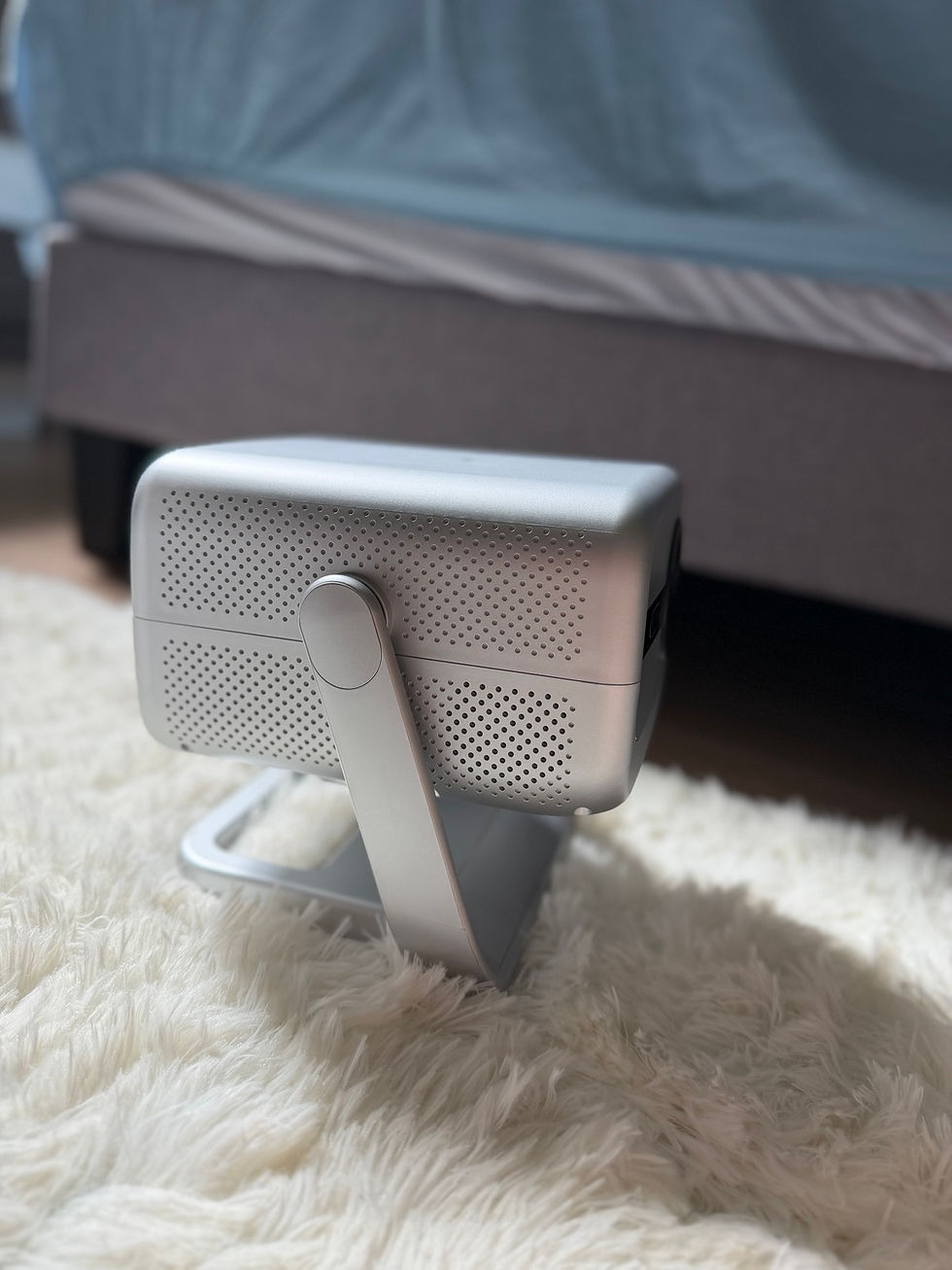
Rear ventilation and connection area, photographed with the body tilted.
A simple setup
The setup screen offered English (Malaysia), followed by network setup. I also found a range of language options in the settings, which is welcome in a multilingual household.
Once connected, navigating the home screen felt familiar. If you have used an Android device, the Home and Back controls are easy to understand. The online update check reported that the installed software was current.
YouTube sign-in was a relief after that: scan the on-screen QR code with my phone, follow the prompts, and I was in within roughly a minute. Spotify was similarly straightforward. More of this, please. My thumb had already done enough password-entry work for one afternoon.

Home screen projected onto my ceiling during the afternoon session. App tiles do not establish playback compatibility.
The remote works
The remote worked while I was lying on the bed with the projector below. That is a small thing, and it matters for the way I actually want to use this product.
Typing with directional buttons is where my enthusiasm dropped a little. Finding each character of a Wi-Fi password is quite a workout for something that is supposed to help me relax. I would have appreciated voice typing, although I did not verify whether voice input is available on this unit.
There is a mouse-icon button on the remote, but I have not yet tested how its pointer mode works. I also noticed some lag when switching between tasks. Everyday navigation was generally straightforward, but it was not consistently instant. (LUMOS advised to point remote control towards the projector for best sensitivity and to prevent lags).
LUMOS’s published specifications list Android 9.0 and 1 GB RAM. Those are manufacturer specifications, not details I independently checked on this unit. An update screen saying the software is current should not be read as a promise of future Android or app updates.

Projection settings during daytime setup, including automatic correction, four-point correction and zoom.
Daytime worked and I would draw the curtains for best movie experience
I tried the LUMOS FLOAT EVO in the afternoon, around 2 p.m., and could see and use the picture without major difficulty. It looked pleasing and sharp to me in that position. I was comfortable during the session, so I do not want to turn this into a complaint that daytime viewing was unbearable. It was not.
Still, for settling into a film or a series, I would draw the curtains or use it at night. With sunlight coming in as well as the projected image, there can be more competing brightness than I personally want. There is a giant fireball outside; I do not need all of its contribution to movie time.
For me, it is a preference for less competing visual input. I can imagine being quite comfortable lying down with the curtains drawn and a proper film on. I have not watched a full episode or film on it yet, so that remains an expectation rather than a completed viewing test.
Honestly, once watching something becomes a task on my work list, part of me immediately wants to watch it on my iPad instead. That says more about my relationship with deadlines than it does about the projector.
I did not measure the room light, image size or projection distance. The photo shows my setup, but neither the time of day nor a phone photograph establishes how it will perform in every bright room. For the best viewing experience, please do note that all projectors perform best under complete darkness, just like in a cinema.
LUMOS lists native 1080p resolution with 4K input support; this is not a native 4K projector. I have not independently measured resolution or brightness. Its guide also advises against spreadsheets and text-heavy presentations, so my recommendation is for home entertainment rather than meeting-room documents.
I used YouTube and Spotify. Netflix playback, iPhone mirroring and HDMI playback remain untested; their presence in a menu or specification is not the same as my having tried them.

English (Malaysia) language selection projected onto the ceiling during initial setup.
The built in speakers are my biggest reservation for music
Then I played some music. Ah. This is where I would change something.
As someone who makes music and works with audio, I found the built-in sound thin, with very little bass and treble that felt too sharp. I tried both YouTube and Spotify because I wanted to be fair to the projector. My impression was similar in both. I would not choose these speakers for enjoying music as a standalone purpose.
Pairing my Xiaomi Bluetooth speaker made a considerable difference to my enjoyment. Suddenly the picture-and-sound combination made much more sense to me. Having a speaker I already own is helpful here; buying another one would change the total cost.
There was also some audible delay in that Bluetooth setup. I have not yet checked dialogue against lip movements, so I cannot promise that an external Bluetooth speaker will give perfectly synchronised movie sound. The speaker, connection and playback app could all matter.
If you already own a suitable speaker, that makes the LUMOS FLOAT EVO more attractive. If you are buying everything from scratch, include audio in your budget rather than assuming the built-in speakers will satisfy you. That said, I tested music only. LUMOS projector’s speakers are built mainly for shows and films, which I haven’t judged yet.

The music section of the launcher during daytime use. I tested audio using YouTube and Spotify.
The small things I would change
There was an HDMI cable in the box, which I appreciated, along with the power cable, remote and instructions. What I did not find was batteries for the remote. Cue me searching through a drawer when all I wanted to do was switch the thing on. To be fair, this is common across many electronics brands, as a safety measure to prevent batteries from leaking in storage. Just have a pair of AAA batteries ready.
It is a small omission, and it interrupts the experience. Because my review box arrived unsealed, I can describe what I received rather than guarantee that every retail package is identical.
I also did not find a lens cap. My room collects dust with impressive enthusiasm, and I noticed dust on the lens during setup. I would like clearer protection for the lens between uses.
Turning the lens downwards does not make the whole projector dust-proof. I am also concerned about keeping the ventilation openings clear over time. I have not tested internal dust protection or inspected the cooling system, so I cannot say how much dust enters or how many fans it uses. Care tips: Clean the lens with a soft microfibre cloth, keep the air vents clear during use, and store it in a dry, dust-free place once cooled.

HDMI cable, remote and power cable laid in the moulded fibre packaging.
Packaging could use fewer separate bags
The moulded fibre supports are worth acknowledging. After unpacking, I also had separate wrappers from the projector, remote and HDMI cable, plus the larger resealable accessory bag. Looking at the pile, I did wonder whether we needed quite so many separate bags.
I would like LUMOS to review whether all of those separate wrappers are necessary. This is a request to reduce avoidable packaging, not a claim that I have calculated the package’s environmental footprint. (LUMOS has assured that each wrap is there to protect against dust and scratches in transit, and the resealable bag is meant to be reused.)
I did not notice silica gel, but the wrapping can still protect against rubbing and dust. I would rather ask for less unnecessary material than pretend I know the environmental impact of every paper-versus-plastic alternative.
The box is also quite nice to keep. If you have a collection of short cables with no permanent address, there is a possible new home for them. I would reuse the resealable bag too, then check local collection rules when anything eventually needs recycling.

Plastic wrapping retained after unpacking the review unit.
My early verdict and who I think it suits
My provisional score is 8 out of 10 for my bedroom use, judged against the RM849 price I saw when testing. I like the flexibility, the usable picture and the convenience of the automatic adjustment. The sound is the clearest compromise for me as a musician.
At RM849, I would consider buying it. At RM1,799, I would not. That is my judgement about what the experience is worth to me.
I think the LUMOS FLOAT EVO is worth considering if you want a bedroom projector, have a suitable ceiling or wall, and value easy positioning. It makes more sense to me if you already have a speaker you like. If rich built-in audio, consistently fast multitasking or dependable small-text presentation is essential, those are reasons to look more carefully before buying.
For my room, the convenience is the strongest reason to consider it. Longer playback, fan noise over time and Bluetooth dialogue synchronisation still need more usage to know. I would rather be clear about that than turn one afternoon into an imaginary week of movie nights.
If that sounds like your kind of setup, check the current LUMOS FLOAT EVO price and package before deciding. If you choose to buy through my affiliate link, I may earn a commission. Please buy it because it fits your room and needs; my review should help you make that decision.
Photo credits
All photographs by Rain Lee Lin Jun. Manufacturer specifications are identified as such; the experience and opinions are based on my first-use session.


Comments